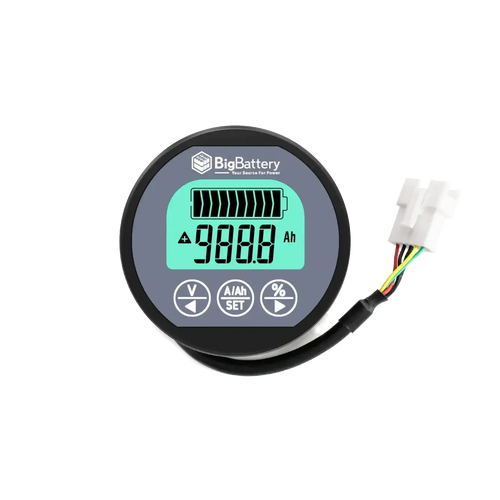

This is a battery capacity monitor, not a battery. It reads voltage, current, and state of charge on systems up to 100V and 350A, using a shunt connected by a 3 meter cable. Use it to track real-time usable capacity on your battery bank instead of guessing from voltage alone.
Note: If you would like to review the manufacturer Product Specifications, Warranty, Brochure, etc., for this system, please refer to the "Resources (System Manuals and Warranty)" Tab above on this page.
Why This Matters
Voltage alone does not tell you how much usable energy is left in a battery bank, especially with LiFePO4 chemistry where the voltage curve stays flat across most of the discharge cycle. A shunt-based capacity monitor measures actual current flow in and out of the bank, giving you a real percentage-based state of charge instead of an estimate. This is standard practice for anyone managing an off-grid or mobile battery system where blind discharge can lead to premature BMS lockout or deep, unplanned discharge events.
Monitor Characteristics
This unit is rated for systems up to 100V and 350A continuous, with a 3 meter cable connecting the shunt to the display head. Chemistry compatibility, enclosure rating, and internal component specifications are not provided in manufacturer data supplied for this listing. [NEEDS VERIFICATION]
Wiring & Configuration Notes
This device is rated for a maximum of 100V and 350A on the monitored circuit. It is not a charge controller, BMS, or battery balancer, and it does not regulate charge or discharge current. It measures and displays data only. Do not exceed the 100V / 350A rating when installing the shunt in a battery bank circuit. [NEEDS VERIFICATION on series/parallel bank sizing beyond stated voltage/current ceiling]
Pro-Installer Tip
Undersized shunt wiring is a common failure point on DIY battery banks. Running a monitor rated for 350A on a bank that regularly peaks above that during high-draw inverter loads causes inaccurate readings and can damage the shunt. Confirm your bank's peak surge draw against the monitor's 350A ceiling before final installation, not just its average continuous draw. Cross-check your capacity monitor's readings against a separate clamp meter during initial setup to confirm calibration. Treat the 100V / 350A rating as a hard ceiling, not a target — sizing your monitor with headroom above your bank's typical peak draw protects both the shunt and the accuracy of your state-of-charge readings over the life of the system.
Key Benefits
- Real-time voltage, current, and capacity monitoring on systems up to 100V / 350A
- 3 meter shunt cable for flexible mounting away from the battery bank
- Lets you track actual usable capacity instead of relying on voltage-only estimates
Technical Table
| Spec | Value |
|---|---|
| Max Voltage | 100V |
| Max Current | 350A |
| Cable Length | 3 Meters |
| SKU | MTR105 |
Note: See "Resources (System Manuals and Warranty)" Tab above for full specifications.
Compatibility & Fitment
Compatible with battery bank monitoring applications up to 100V and 350A continuous, using the included 3 meter shunt cable. Not compatible as a substitute for a Battery Management System (BMS) — it does not perform cell balancing or charge/discharge protection. Not intended for systems exceeding 100V or 350A. Enclosure rating, chemistry-specific programming, and mounting hardware details are not specified in available manufacturer data. [NEEDS VERIFICATION]
FAQ
Is this a battery or a monitor?
It is a monitor. It measures voltage, current, and capacity on a battery bank; it does not store energy itself.
What is the maximum voltage and current this monitor supports?
100V and 350A continuous, per manufacturer rating.
How long is the shunt cable?
3 meters.
Does this monitor act as a BMS or charge controller?
No. It displays voltage, current, and capacity data only. It does not regulate charging, discharging, or cell balancing.
Will this work with lithium or lead-acid battery banks?
Chemistry-specific compatibility is not specified in available manufacturer data. [NEEDS VERIFICATION]
Warranty & Support
Warranty terms for this monitor are not included in the data provided for this listing. Refer to the "Resources (System Manuals and Warranty)" tab above for manufacturer documentation. If you have questions before ordering, ask us — we always reply back.